

A simple MP4 video trimmer using the WebCodecs API
API Reference
View the API Reference here.
npm install media-trimmerimport { trim } from 'media-trimmer'
try {
// The input video must be a `.mp4`/`.mov` file with a video track
// and the browser must support video encoding with the WebCodecs API
await trim('video.mp4', {
start: 2, // start time in seconds
end: 10, // end time in seconds
mute: false, // ignore the audio track?
})
} catch (error) {
alert(error)
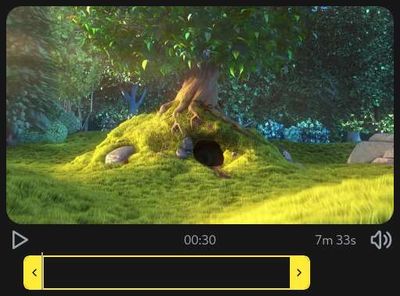
}It also comes with a Web Component UI:
<!-- after importing the library, the <media-trimmer> custom element will be defined -->
<media-trimmer id="trimmer"></media-trimmer>
<button id="export" type="buton">Get trimmed video</button>
<input id="input" type="file" accept="video/*" />
<progress id="export-progress" max="1"></progress>

<script type="module">
  const trimmer = document.getElementById('trimmer')
  const input = document.getElementById('input')
  const button = document.getElementById('export')
  const progress = document.getElementById('export-progress')

  // use the file that the user picks
  input.addEventListener('input', (event) => {
    trimmer.source = event.target.files[0]
  })

  // save the trimmed video to a file
  button.addEventListener('click', async () => {
    const blob = await trimmer.toBlob()

    const anchor = document.createElement('a')
    const blobUrl = URL.createObjectURL(blob)

    anchor.href = blobUrl
    anchor.target = '_blank'
    anchor.download = 'trimmed.webm'
    anchor.dispatchEvent(new MouseEvent('click'))
    URL.revokeObjectURL(blobUrl)
  })

  // display the trimming progress
  trimmer.addEventListener('progress', (event) => (progress.value = event.target.progress))
</script>
Powered by:
Roadmap
- [ ] Lossless trimming
- [ ] Bitrate/filesize controls
- [x] Webm support
- [ ] Color profile preservation
- [ ] Increased browser and codec support via LibAVJS-WebCodecs-Polyfill