

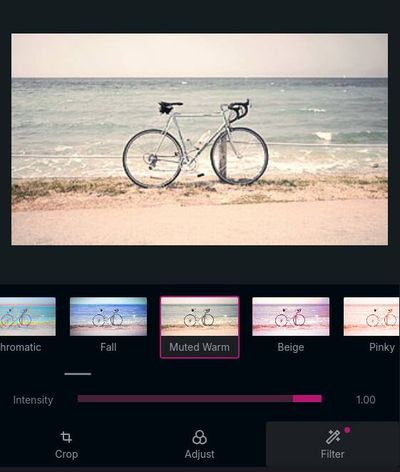
A browser-based image editor with WebGL filters
API Reference
View the API Reference here.
npm install webgl-media-editor<div>
<!-- after importing the library, these <media-editor-*> custom elements will be defined -->
<!-- show a preview of the image being edited -->
<media-editor-preview></media-editor-preview>
<!-- show a menu of filters to apply to the image -->
<media-editor-filter-menu></media-editor-filter-menu>
<button id="export" type="buton">Export</button>
</div>import { MediaEditor } from 'webgl-media-editor'
const editor = new MediaEditor()
// after creating the editor, give it to the <media-editor-*> elements
const mediaEditorElements = document.querySelectorAll('media-editor-preview, media-editor-filter-menu')
for (const element of mediaEditorElements) {
element.editor = editor
}
// give the editor the URL of an image to load and edit
editor.setSource('photo.jpg')
// you can edit programatically
editor.setEditState({
// index of effect. -1 to apply no effect
effect: 2,
// the intensity of the effect from 0 to 1
intensity: 0.75,
// optional adjustments to apply. adjustment values go from -1 to 1
adjustments: { brightness: 0, contrast: 0.25, saturation: 0.3 },
// optional crop
crop: { x: 10, y: 10, width: 200, height: 200, rotate: 90 },
})
document.getElementById('export').addEventListener('click', async () => {
const blob = await editor.toBlob()
window.open(URL.createObjectURL(blob))
})Powered by: